> ## Documentation Index
> Fetch the complete documentation index at: https://knowledge.flowella.io/llms.txt
> Use this file to discover all available pages before exploring further.
# Billing and subscriptions
> Pick a plan, manage your subscription through Stripe, and understand what happens when a subscription is trialing, active, or lapsed.
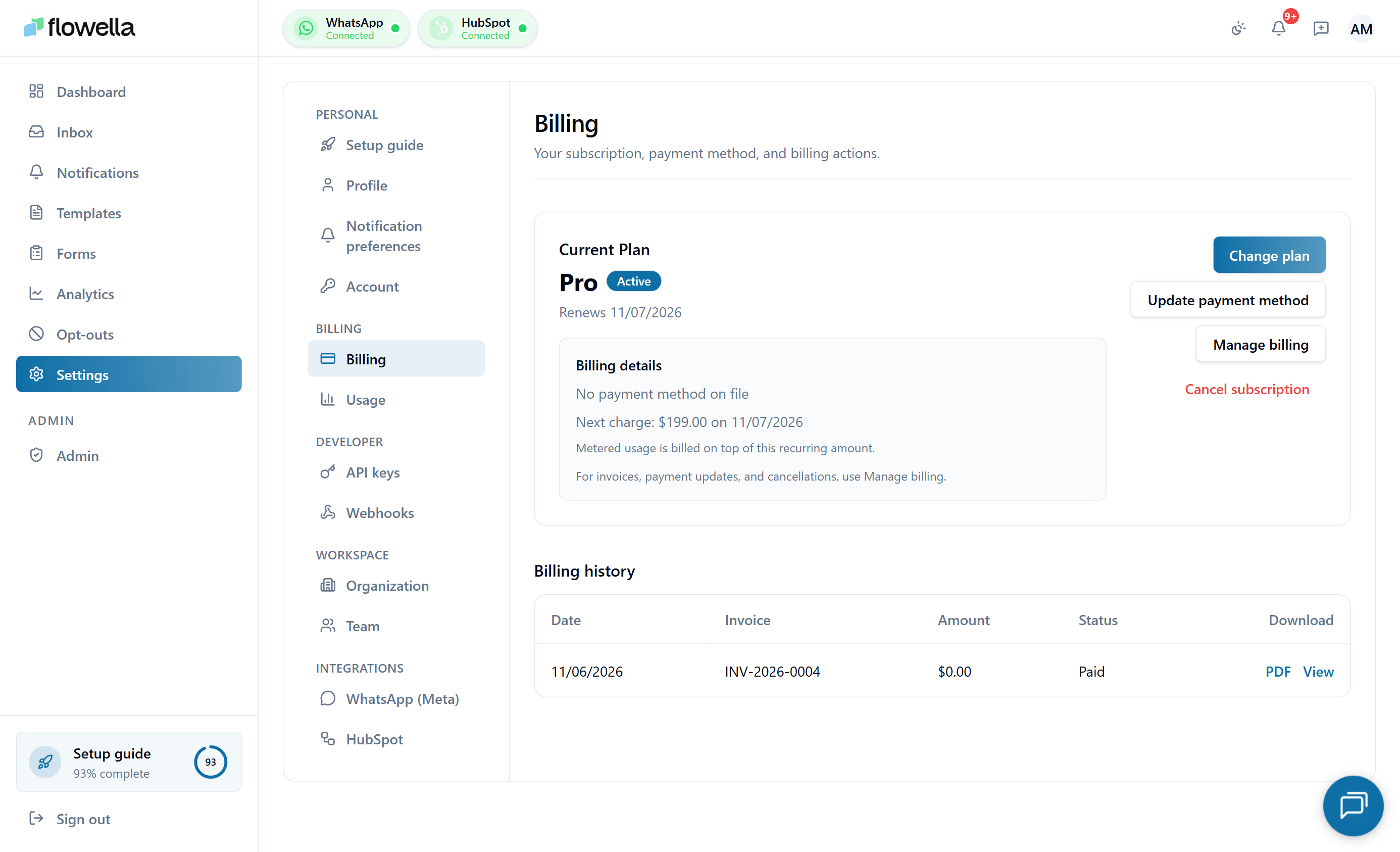 Flowella billing is handled through Stripe. This page covers how to choose a plan, where to manage payment details, and what changes when your subscription is in different states.
For plan limits and what each tier includes, see [Plans and limits](/account/plans-and-limits).
## Who can manage billing
Only the **Owner** of an organisation can change plan or update payment details. Admins and Members see the billing page but cannot make changes.
## Choosing or changing a plan
Go to **Settings → Billing** in the app. The page always syncs with Stripe on load, so you see the canonical state, not a cached snapshot.
Compare the plan cards on the Billing page and click **Upgrade to Starter** or **Upgrade to Pro**. **Free** stays visible for reference, and **Enterprise** shows a **Contact sales** button that opens [flowella.io/contact](https://flowella.io/contact) instead of starting a checkout.
Flowella opens Stripe Checkout with your **email and phone** (if set on your profile) prefilled. Enter your **card details** and a **billing address** — the address is required so Stripe can apply the correct automatic tax. Stripe handles card processing; Flowella never sees your card number.
After checkout, Stripe redirects you back to **Settings → Billing**. The page polls until the new subscription is reflected in the app, usually within a few seconds. If checkout is cancelled, your existing plan is unchanged.
### Plan cards on the Billing page
The Billing page shows four cards side by side. Prices come from Stripe, so what you see on the card is what Stripe Checkout will charge.
* **Free** — Explore Flowella with a single workspace.
* One organization workspace
* WhatsApp inbox basics
* HubSpot forms catalog
* Email support
* **Starter** — For teams just getting started with WhatsApp for Business.
* Everything in Free
* 1,000 included billable conversations / month
* Shared team inbox
* Templates and HubSpot flows
* Email support
* **Pro** — For growing teams scaling WhatsApp automation.
* Everything in Starter
* 2,500 included billable conversations / month
* Priority support
* Channel analytics
* API access
* **Enterprise** — For organisations needing advanced support and bespoke solutions.
* Everything in Pro
* Advanced support
* Bespoke solutions
Flowella plan pricing only. Meta bills WhatsApp conversation fees separately — see [Pricing and conversation categories](/account/pricing-and-conversation-categories).
### Tiered pricing display
The Billing page renders your plan's **expanded pricing tiers** — base subscription plus any tiered overage rates — alongside a **payment summary** showing the most recent invoice and next renewal date. If you're on Starter or Pro, this is where you can see at a glance what you'd pay for an extra block of conversations.
### Usage metering and Stripe meter health
Flowella reports your monthly conversation count to Stripe as a usage meter. The Billing page surfaces a **meter health** indicator so you can confirm the count Stripe sees matches the count Flowella has recorded. If a discrepancy is detected (meter drift), the page shows a warning and Flowella automatically reconciles in the background. If the warning persists for more than a billing cycle, contact support — it usually means a webhook between Stripe and Flowella has been blocked.
## Managing an existing subscription
Once you have an active subscription, **Settings → Billing** shows a **Manage subscription** button that opens the **Stripe customer portal** in a new tab. From there you can:
* Update card details
* Download invoices
* Switch plans
* Cancel the subscription
Changes made in the portal are reflected in Flowella shortly after.
## Subscription states
Your subscription is always in one of these states:
| Status | What it means | What you can do |
| ------------ | ---------------------------------------------------------- | -------------------------------------------------------------------------------------------------- |
| **Trialing** | You are inside the 14-day free trial provisioned at signup | Full access, capped at 5,000 outbound messages — see [Plans and limits](/account/plans-and-limits) |
| **Active** | Subscription is paid and current | Full access to features for that plan |
| **Past due** | A payment failed and Stripe is retrying | Existing data is intact; some actions may be limited until payment succeeds |
| **Canceled** | Subscription has been cancelled | The org reverts to limited access at the end of the paid period |
**Trialing** and **Active** behave the same way for what you can do in the app.
## What is locked when a subscription lapses
If your subscription becomes past due or is cancelled and the period ends, paid features are restricted. You will still be able to:
* Sign in and view your data
* Reach the Billing page to fix payment
You will not be able to send new messages, publish new templates, or use the API on paid endpoints until billing is restored.
Your contacts, opt-out list, conversation history, and configuration are preserved while a subscription is paused. Nothing is deleted automatically.
## Plans
Flowella offers four tiers:
* **Free** — try the basics
* **Starter** — small teams
* **Pro** — growing programmes
* **Enterprise** — large or regulated deployments
For limits and feature differences, see [Plans and limits](/account/plans-and-limits) and [flowella.io/pricing](https://flowella.io/pricing).
If you need an annual contract, custom volume, or a security review for Enterprise, contact [sales](https://flowella.io/contact).
## Related
What each plan includes, trial cap, and how overage works.
How Meta charges are separate and how Flowella usage is counted.
Track conversation count and remaining allowance in real time.
What's blocked when a payment fails and how to restore access.
The separate card Meta uses for WhatsApp delivery fees.
Only Owners can change billing.
Flowella billing is handled through Stripe. This page covers how to choose a plan, where to manage payment details, and what changes when your subscription is in different states.
For plan limits and what each tier includes, see [Plans and limits](/account/plans-and-limits).
## Who can manage billing
Only the **Owner** of an organisation can change plan or update payment details. Admins and Members see the billing page but cannot make changes.
## Choosing or changing a plan
Go to **Settings → Billing** in the app. The page always syncs with Stripe on load, so you see the canonical state, not a cached snapshot.
Compare the plan cards on the Billing page and click **Upgrade to Starter** or **Upgrade to Pro**. **Free** stays visible for reference, and **Enterprise** shows a **Contact sales** button that opens [flowella.io/contact](https://flowella.io/contact) instead of starting a checkout.
Flowella opens Stripe Checkout with your **email and phone** (if set on your profile) prefilled. Enter your **card details** and a **billing address** — the address is required so Stripe can apply the correct automatic tax. Stripe handles card processing; Flowella never sees your card number.
After checkout, Stripe redirects you back to **Settings → Billing**. The page polls until the new subscription is reflected in the app, usually within a few seconds. If checkout is cancelled, your existing plan is unchanged.
### Plan cards on the Billing page
The Billing page shows four cards side by side. Prices come from Stripe, so what you see on the card is what Stripe Checkout will charge.
* **Free** — Explore Flowella with a single workspace.
* One organization workspace
* WhatsApp inbox basics
* HubSpot forms catalog
* Email support
* **Starter** — For teams just getting started with WhatsApp for Business.
* Everything in Free
* 1,000 included billable conversations / month
* Shared team inbox
* Templates and HubSpot flows
* Email support
* **Pro** — For growing teams scaling WhatsApp automation.
* Everything in Starter
* 2,500 included billable conversations / month
* Priority support
* Channel analytics
* API access
* **Enterprise** — For organisations needing advanced support and bespoke solutions.
* Everything in Pro
* Advanced support
* Bespoke solutions
Flowella plan pricing only. Meta bills WhatsApp conversation fees separately — see [Pricing and conversation categories](/account/pricing-and-conversation-categories).
### Tiered pricing display
The Billing page renders your plan's **expanded pricing tiers** — base subscription plus any tiered overage rates — alongside a **payment summary** showing the most recent invoice and next renewal date. If you're on Starter or Pro, this is where you can see at a glance what you'd pay for an extra block of conversations.
### Usage metering and Stripe meter health
Flowella reports your monthly conversation count to Stripe as a usage meter. The Billing page surfaces a **meter health** indicator so you can confirm the count Stripe sees matches the count Flowella has recorded. If a discrepancy is detected (meter drift), the page shows a warning and Flowella automatically reconciles in the background. If the warning persists for more than a billing cycle, contact support — it usually means a webhook between Stripe and Flowella has been blocked.
## Managing an existing subscription
Once you have an active subscription, **Settings → Billing** shows a **Manage subscription** button that opens the **Stripe customer portal** in a new tab. From there you can:
* Update card details
* Download invoices
* Switch plans
* Cancel the subscription
Changes made in the portal are reflected in Flowella shortly after.
## Subscription states
Your subscription is always in one of these states:
| Status | What it means | What you can do |
| ------------ | ---------------------------------------------------------- | -------------------------------------------------------------------------------------------------- |
| **Trialing** | You are inside the 14-day free trial provisioned at signup | Full access, capped at 5,000 outbound messages — see [Plans and limits](/account/plans-and-limits) |
| **Active** | Subscription is paid and current | Full access to features for that plan |
| **Past due** | A payment failed and Stripe is retrying | Existing data is intact; some actions may be limited until payment succeeds |
| **Canceled** | Subscription has been cancelled | The org reverts to limited access at the end of the paid period |
**Trialing** and **Active** behave the same way for what you can do in the app.
## What is locked when a subscription lapses
If your subscription becomes past due or is cancelled and the period ends, paid features are restricted. You will still be able to:
* Sign in and view your data
* Reach the Billing page to fix payment
You will not be able to send new messages, publish new templates, or use the API on paid endpoints until billing is restored.
Your contacts, opt-out list, conversation history, and configuration are preserved while a subscription is paused. Nothing is deleted automatically.
## Plans
Flowella offers four tiers:
* **Free** — try the basics
* **Starter** — small teams
* **Pro** — growing programmes
* **Enterprise** — large or regulated deployments
For limits and feature differences, see [Plans and limits](/account/plans-and-limits) and [flowella.io/pricing](https://flowella.io/pricing).
If you need an annual contract, custom volume, or a security review for Enterprise, contact [sales](https://flowella.io/contact).
## Related
What each plan includes, trial cap, and how overage works.
How Meta charges are separate and how Flowella usage is counted.
Track conversation count and remaining allowance in real time.
What's blocked when a payment fails and how to restore access.
The separate card Meta uses for WhatsApp delivery fees.
Only Owners can change billing.