> ## Documentation Index
> Fetch the complete documentation index at: https://knowledge.flowella.io/llms.txt
> Use this file to discover all available pages before exploring further.
# Manage Flowella REST API keys
> Create, view, rotate, and revoke API keys for the Flowella REST API from Settings → API keys, including scopes, expiry, and best practices for safe storage.
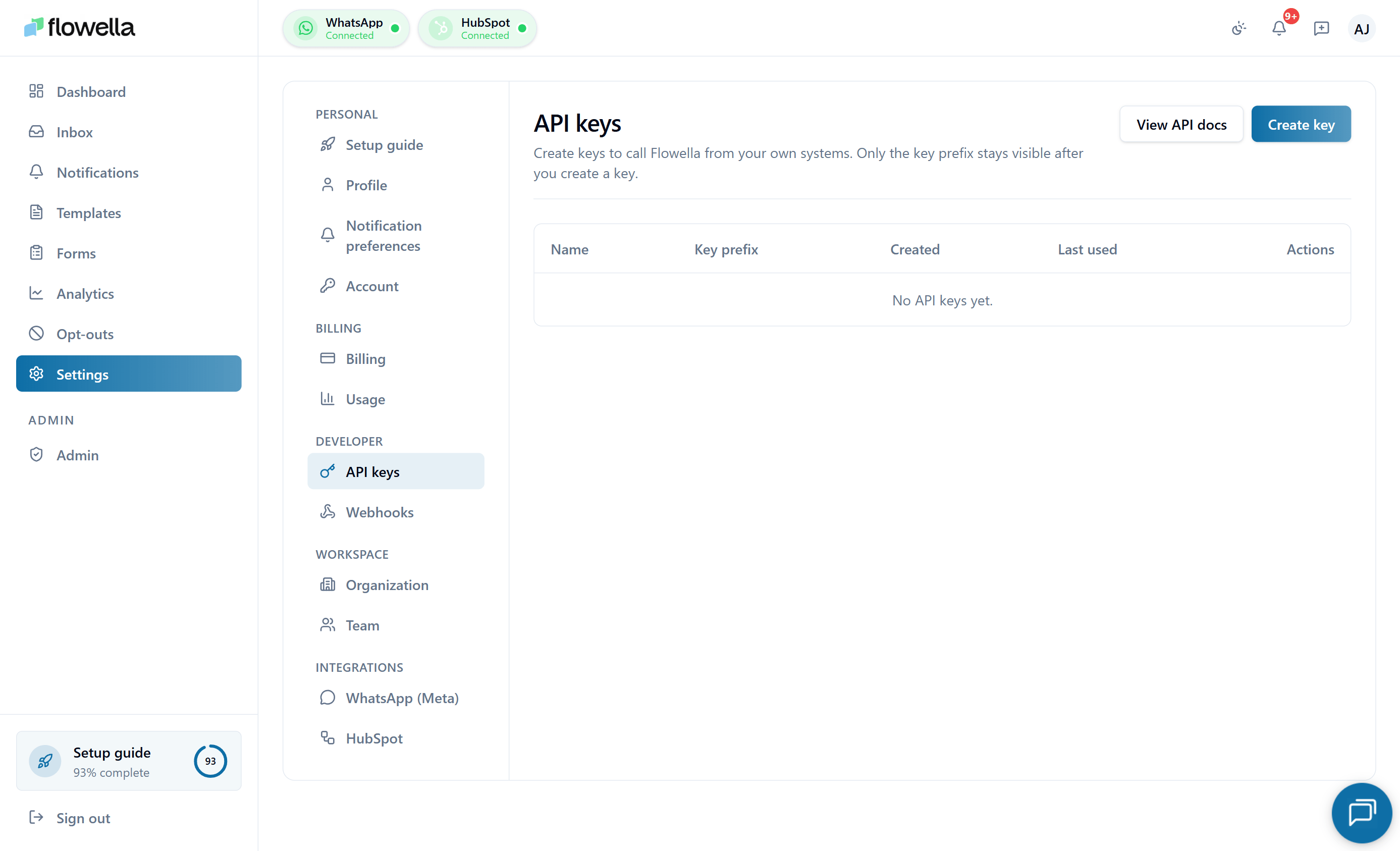 API keys let scripts, no-code tools, and your own backend services call the Flowella REST API on behalf of your organisation. This page covers how to manage keys from the in-app **Settings → API keys** screen.
For what the API can do, see the [API reference](/api-reference/introduction).
## Who can manage API keys
Only the **Owner** or **Admin** roles see Settings → API keys. Members do not have access to this screen and cannot call API endpoints.
## Creating an API key
From the left navigation, go to **Settings → API keys**.
Give the key a **label** that describes what it's for (for example, `n8n production`, `analytics export script`). Labels are visible only inside Flowella — they're not sent in API requests.
By default, keys inherit the full set of API endpoints available to your plan. You can optionally restrict a key to a subset of scopes — for example, **read-only analytics** or **messages: send only**.
Flowella shows the secret token **exactly once** in a confirmation modal. Copy it now — you cannot view it again. If you lose it, you must revoke the key and create a new one.
The secret is shown only once. Flowella stores a hashed copy and cannot recover the plaintext. Treat keys like passwords — never commit them to source control, never paste them into chat or shared docs.
## Using a key
Pass the key as a bearer token on every request:
```bash cURL theme={null}
curl https://api.flowella.io/v1/messages \
-H "Authorization: Bearer flwl_live_..." \
-H "Content-Type: application/json"
```
```js Node.js theme={null}
await fetch("https://api.flowella.io/v1/messages", {
method: "POST",
headers: {
Authorization: `Bearer ${process.env.FLOWELLA_API_KEY}`,
"Content-Type": "application/json",
},
body: JSON.stringify({ /* ... */ }),
});
```
```python Python theme={null}
import os, requests
requests.post(
"https://api.flowella.io/v1/messages",
headers={
"Authorization": f"Bearer {os.environ['FLOWELLA_API_KEY']}",
"Content-Type": "application/json",
},
json={"...": "..."},
)
```
See the [API reference](/api-reference/introduction) for endpoint details, rate limits, and error codes.
## Viewing existing keys
The Settings → API keys list shows each key's:
* **Label**
* **Prefix** (first eight characters, like `flwl_live_a1b2c3`) — useful for matching against logs.
* **Scope**
* **Created at** and **created by**
* **Last used at** — updated on every successful request.
* **Status** — active or revoked.
The plaintext secret is never displayed after creation.
## Rotating a key
There's no in-place rotate — you create a new key and revoke the old one once your service has switched over.
Follow the Create flow above to mint a new key with the same scope.
Update your service (or n8n workflow, Postman environment, etc.) to use the new bearer token.
Watch the new key's **Last used at** field — it updates within a minute of the first call.
Click **Revoke** on the previous key. From that point any request using the old secret returns `401 Unauthorized`.
## Revoking a key
Click **Revoke** on the row, then confirm in the dialog. Revocation is **immediate** — in-flight requests using that key may complete, but the next request returns `401`.
A revoked key cannot be reactivated. The row remains visible in the list (greyed out, with the revocation timestamp) so you have an audit trail.
## Audit log
Every **create**, **revoke**, and (where enabled) **scope change** event is written to the org audit log with your user, IP, and trace context. If your plan or contract includes the audit log feature, you can review API-key activity there.
## Common questions
There is no hard limit on hobby or paid plans, but very large numbers of active keys (50+) make rotation and review hard. Use one key per integration rather than one per developer.
Keys do not expire automatically. We recommend rotating them at least every 12 months and immediately if a key may have been exposed.
Currently keys are scoped to the **organisation**, not a specific channel. Channel-level scoping is on the roadmap. In the meantime, choose the active channel via the request payload or path.
Revoke it immediately from this page. Create a replacement with the same scope. Check the audit log for any requests that used the key in the time it was exposed, and rotate any downstream secrets that key may have created (for example, webhook signing keys).
## Related
Auth, errors, rate limits, and pagination.
Push events to your own systems instead of polling.
Only Owners and Admins can manage API keys.
Audit log coverage for key create / revoke events.
API keys let scripts, no-code tools, and your own backend services call the Flowella REST API on behalf of your organisation. This page covers how to manage keys from the in-app **Settings → API keys** screen.
For what the API can do, see the [API reference](/api-reference/introduction).
## Who can manage API keys
Only the **Owner** or **Admin** roles see Settings → API keys. Members do not have access to this screen and cannot call API endpoints.
## Creating an API key
From the left navigation, go to **Settings → API keys**.
Give the key a **label** that describes what it's for (for example, `n8n production`, `analytics export script`). Labels are visible only inside Flowella — they're not sent in API requests.
By default, keys inherit the full set of API endpoints available to your plan. You can optionally restrict a key to a subset of scopes — for example, **read-only analytics** or **messages: send only**.
Flowella shows the secret token **exactly once** in a confirmation modal. Copy it now — you cannot view it again. If you lose it, you must revoke the key and create a new one.
The secret is shown only once. Flowella stores a hashed copy and cannot recover the plaintext. Treat keys like passwords — never commit them to source control, never paste them into chat or shared docs.
## Using a key
Pass the key as a bearer token on every request:
```bash cURL theme={null}
curl https://api.flowella.io/v1/messages \
-H "Authorization: Bearer flwl_live_..." \
-H "Content-Type: application/json"
```
```js Node.js theme={null}
await fetch("https://api.flowella.io/v1/messages", {
method: "POST",
headers: {
Authorization: `Bearer ${process.env.FLOWELLA_API_KEY}`,
"Content-Type": "application/json",
},
body: JSON.stringify({ /* ... */ }),
});
```
```python Python theme={null}
import os, requests
requests.post(
"https://api.flowella.io/v1/messages",
headers={
"Authorization": f"Bearer {os.environ['FLOWELLA_API_KEY']}",
"Content-Type": "application/json",
},
json={"...": "..."},
)
```
See the [API reference](/api-reference/introduction) for endpoint details, rate limits, and error codes.
## Viewing existing keys
The Settings → API keys list shows each key's:
* **Label**
* **Prefix** (first eight characters, like `flwl_live_a1b2c3`) — useful for matching against logs.
* **Scope**
* **Created at** and **created by**
* **Last used at** — updated on every successful request.
* **Status** — active or revoked.
The plaintext secret is never displayed after creation.
## Rotating a key
There's no in-place rotate — you create a new key and revoke the old one once your service has switched over.
Follow the Create flow above to mint a new key with the same scope.
Update your service (or n8n workflow, Postman environment, etc.) to use the new bearer token.
Watch the new key's **Last used at** field — it updates within a minute of the first call.
Click **Revoke** on the previous key. From that point any request using the old secret returns `401 Unauthorized`.
## Revoking a key
Click **Revoke** on the row, then confirm in the dialog. Revocation is **immediate** — in-flight requests using that key may complete, but the next request returns `401`.
A revoked key cannot be reactivated. The row remains visible in the list (greyed out, with the revocation timestamp) so you have an audit trail.
## Audit log
Every **create**, **revoke**, and (where enabled) **scope change** event is written to the org audit log with your user, IP, and trace context. If your plan or contract includes the audit log feature, you can review API-key activity there.
## Common questions
There is no hard limit on hobby or paid plans, but very large numbers of active keys (50+) make rotation and review hard. Use one key per integration rather than one per developer.
Keys do not expire automatically. We recommend rotating them at least every 12 months and immediately if a key may have been exposed.
Currently keys are scoped to the **organisation**, not a specific channel. Channel-level scoping is on the roadmap. In the meantime, choose the active channel via the request payload or path.
Revoke it immediately from this page. Create a replacement with the same scope. Check the audit log for any requests that used the key in the time it was exposed, and rotate any downstream secrets that key may have created (for example, webhook signing keys).
## Related
Auth, errors, rate limits, and pagination.
Push events to your own systems instead of polling.
Only Owners and Admins can manage API keys.
Audit log coverage for key create / revoke events.