> ## Documentation Index
> Fetch the complete documentation index at: https://knowledge.flowella.io/llms.txt
> Use this file to discover all available pages before exploring further.
# Organization settings: workspace name and language
> Manage your Flowella workspace name, business email address, default content language, and other organisation-wide settings from Settings → Organization.
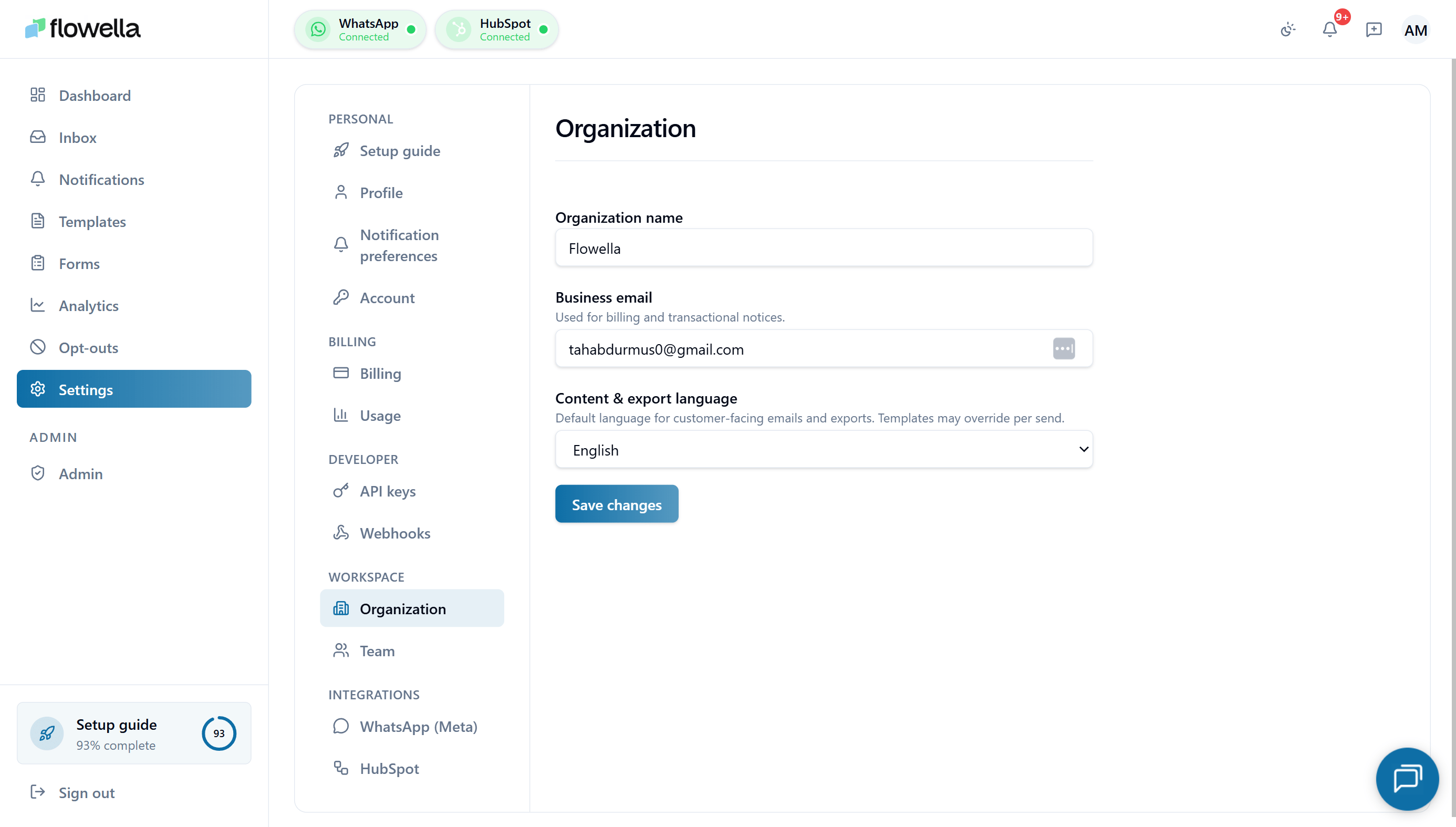 Your **organization** (sometimes called a workspace) is the top-level container in Flowella. Everything you create — templates, forms, channels, opt-outs, API keys, team members, and the HubSpot connection — belongs to an organization.
A single Flowella account can belong to multiple organizations. Each organization has its own settings, billing, and team. The **Settings → Organization** screen is where the org-wide details live.
## Who can change organization settings
| Role | Can edit organization settings |
| ---------- | -------------------------------------------------------- |
| **Owner** | Yes — including the organization name and business email |
| **Admin** | Yes |
| **Member** | No — the fields are read-only |
For the full role breakdown, see [Team and roles](/settings/team).
## Opening Settings → Organization
From the left navigation click **Settings**, then choose **Organization** under the **Workspace** section of the settings sidebar.
## What you can change
### Organization name
The human-readable name for your workspace. It appears:
* In the org switcher when you belong to more than one Flowella organization
* On Stripe invoices and receipts
* On audit log entries and outbound webhook payloads
We recommend the legal name of the business that owns the WhatsApp Business Account, so invoices line up with your accounting records.
Renaming the organization does **not** change your subdomain or any deep links. The internal organization ID stays the same, so existing API keys, webhook subscriptions, and HubSpot connections continue to work.
### Business email
The email address Flowella uses for **billing and transactional notices** — invoices, payment failure alerts, subscription state changes, and Meta-related billing events.
* This is the org-level address, **not** an individual user's account email. Use a shared inbox (for example `billing@yourcompany.com`) so cover is maintained when people leave.
* If you leave the field empty, Flowella falls back to the **Owner's** profile email.
* This address does **not** receive product notifications — those follow each user's [notification preferences](/settings/notification-preferences).
Most finance teams want billing email separate from the person who set the org up. Set the business email to your accounts inbox to avoid invoices being missed when staff change.
### Content & export language
The default language for **customer-facing content** generated by Flowella, including:
* Default copy in system-sent emails to your customers (for example, opt-out confirmation emails where applicable)
* Headers and labels on CSV/XLSX exports from the inbox, analytics, and forms
* Default locale used when no template-level language override is set
Available languages match Flowella's supported UI locales:
* English (en)
* Español (es)
* Türkçe (tr)
This is the **organization default**. Individual templates and Flow forms can override it per send — see [Template reference](/app/template-reference). Each user's UI language is still controlled by their own [profile locale](/settings/profile).
## Saving changes
Click **Save changes** at the bottom of the screen. Updates take effect immediately:
* The new organization name shows in the switcher on next page load.
* Stripe customer records are updated within a few seconds.
* The new content language applies to the next export or system email — already-queued items keep the old language.
## Related
Invite teammates and manage roles for this workspace.
Plan, payment method, and invoices for this organization.
Connect and manage the WhatsApp Business Account attached to this org.
Your personal account details — separate from organization-level settings.
Your **organization** (sometimes called a workspace) is the top-level container in Flowella. Everything you create — templates, forms, channels, opt-outs, API keys, team members, and the HubSpot connection — belongs to an organization.
A single Flowella account can belong to multiple organizations. Each organization has its own settings, billing, and team. The **Settings → Organization** screen is where the org-wide details live.
## Who can change organization settings
| Role | Can edit organization settings |
| ---------- | -------------------------------------------------------- |
| **Owner** | Yes — including the organization name and business email |
| **Admin** | Yes |
| **Member** | No — the fields are read-only |
For the full role breakdown, see [Team and roles](/settings/team).
## Opening Settings → Organization
From the left navigation click **Settings**, then choose **Organization** under the **Workspace** section of the settings sidebar.
## What you can change
### Organization name
The human-readable name for your workspace. It appears:
* In the org switcher when you belong to more than one Flowella organization
* On Stripe invoices and receipts
* On audit log entries and outbound webhook payloads
We recommend the legal name of the business that owns the WhatsApp Business Account, so invoices line up with your accounting records.
Renaming the organization does **not** change your subdomain or any deep links. The internal organization ID stays the same, so existing API keys, webhook subscriptions, and HubSpot connections continue to work.
### Business email
The email address Flowella uses for **billing and transactional notices** — invoices, payment failure alerts, subscription state changes, and Meta-related billing events.
* This is the org-level address, **not** an individual user's account email. Use a shared inbox (for example `billing@yourcompany.com`) so cover is maintained when people leave.
* If you leave the field empty, Flowella falls back to the **Owner's** profile email.
* This address does **not** receive product notifications — those follow each user's [notification preferences](/settings/notification-preferences).
Most finance teams want billing email separate from the person who set the org up. Set the business email to your accounts inbox to avoid invoices being missed when staff change.
### Content & export language
The default language for **customer-facing content** generated by Flowella, including:
* Default copy in system-sent emails to your customers (for example, opt-out confirmation emails where applicable)
* Headers and labels on CSV/XLSX exports from the inbox, analytics, and forms
* Default locale used when no template-level language override is set
Available languages match Flowella's supported UI locales:
* English (en)
* Español (es)
* Türkçe (tr)
This is the **organization default**. Individual templates and Flow forms can override it per send — see [Template reference](/app/template-reference). Each user's UI language is still controlled by their own [profile locale](/settings/profile).
## Saving changes
Click **Save changes** at the bottom of the screen. Updates take effect immediately:
* The new organization name shows in the switcher on next page load.
* Stripe customer records are updated within a few seconds.
* The new content language applies to the next export or system email — already-queued items keep the old language.
## Related
Invite teammates and manage roles for this workspace.
Plan, payment method, and invoices for this organization.
Connect and manage the WhatsApp Business Account attached to this org.
Your personal account details — separate from organization-level settings.