> ## Documentation Index
> Fetch the complete documentation index at: https://knowledge.flowella.io/llms.txt
> Use this file to discover all available pages before exploring further.
# Settings overview
> A map of every screen in Flowella's Settings area — personal account, billing, developer tools, workspace, team, integrations, and notification preferences.
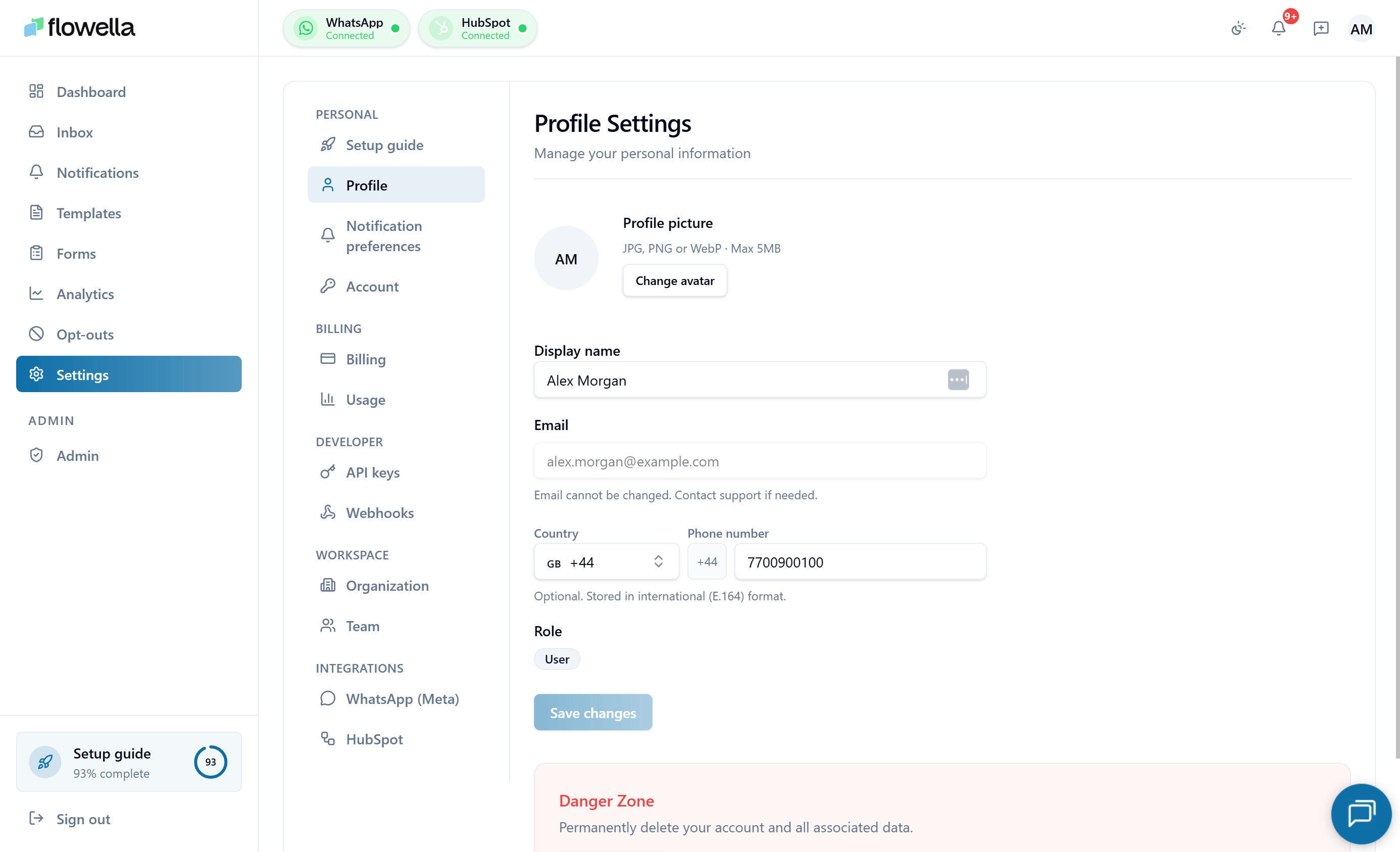 The **Settings** area in Flowella is split into five sections that mirror the in-app sidebar. Personal sections apply to your user account; Workspace, Billing, Developer, and Integrations apply to the whole organization.
## Personal
Settings that apply to your individual Flowella user, not the organization.
Display name, avatar, phone number, and UI locale.
Choose which Flowella events deliver to your in-app feed and email.
Password, passkeys, active sessions, and backup sign-in.
## Billing
Subscription, invoices, and conversation usage for the organization.
Plan, payment method, invoices, and subscription state.
Current month's conversation count, allowance, and caps.
For plan limits and the relationship between Flowella's subscription and Meta's per-conversation fees, see [Plans and limits](/account/plans-and-limits) and [Pricing and conversation categories](/account/pricing-and-conversation-categories).
## Developer
Programmatic access to your Flowella organization.
Create, rotate, and revoke keys for the Flowella REST API.
Outbound webhooks: endpoints, signing secrets, event subscriptions, retries.
## Workspace
Organization-wide identity and membership.
Workspace name, business email, and default content language.
Members, roles, invitations, and ownership transfer.
## Integrations
External platforms connected to your Flowella organization.
Connected WABAs and phone numbers, token health, re-authorisation.
Portal connection, scopes, and the property mapping that powers workflows.
## Who can change what
| Setting area | Owner | Admin | Member |
| ------------------------------------------ | ----- | ---------------------- | --------- |
| Personal (Profile, Notifications, Account) | Self | Self | Self |
| Billing | Yes | Read-only | Read-only |
| Usage | Read | Read | Read |
| API keys, Webhooks | Yes | Yes | Read-only |
| Organization | Yes | Yes | Read-only |
| Team | Yes | Yes (except Owner row) | Read-only |
| Integrations | Yes | Yes | Read-only |
See [Team](/settings/team) for the full role definitions.
The **Settings** area in Flowella is split into five sections that mirror the in-app sidebar. Personal sections apply to your user account; Workspace, Billing, Developer, and Integrations apply to the whole organization.
## Personal
Settings that apply to your individual Flowella user, not the organization.
Display name, avatar, phone number, and UI locale.
Choose which Flowella events deliver to your in-app feed and email.
Password, passkeys, active sessions, and backup sign-in.
## Billing
Subscription, invoices, and conversation usage for the organization.
Plan, payment method, invoices, and subscription state.
Current month's conversation count, allowance, and caps.
For plan limits and the relationship between Flowella's subscription and Meta's per-conversation fees, see [Plans and limits](/account/plans-and-limits) and [Pricing and conversation categories](/account/pricing-and-conversation-categories).
## Developer
Programmatic access to your Flowella organization.
Create, rotate, and revoke keys for the Flowella REST API.
Outbound webhooks: endpoints, signing secrets, event subscriptions, retries.
## Workspace
Organization-wide identity and membership.
Workspace name, business email, and default content language.
Members, roles, invitations, and ownership transfer.
## Integrations
External platforms connected to your Flowella organization.
Connected WABAs and phone numbers, token health, re-authorisation.
Portal connection, scopes, and the property mapping that powers workflows.
## Who can change what
| Setting area | Owner | Admin | Member |
| ------------------------------------------ | ----- | ---------------------- | --------- |
| Personal (Profile, Notifications, Account) | Self | Self | Self |
| Billing | Yes | Read-only | Read-only |
| Usage | Read | Read | Read |
| API keys, Webhooks | Yes | Yes | Read-only |
| Organization | Yes | Yes | Read-only |
| Team | Yes | Yes (except Owner row) | Read-only |
| Integrations | Yes | Yes | Read-only |
See [Team](/settings/team) for the full role definitions.