> ## Documentation Index
> Fetch the complete documentation index at: https://knowledge.flowella.io/llms.txt
> Use this file to discover all available pages before exploring further.
# Usage
> Track your current month's WhatsApp conversation count, see how much of your allowance remains, and understand soft and hard caps.
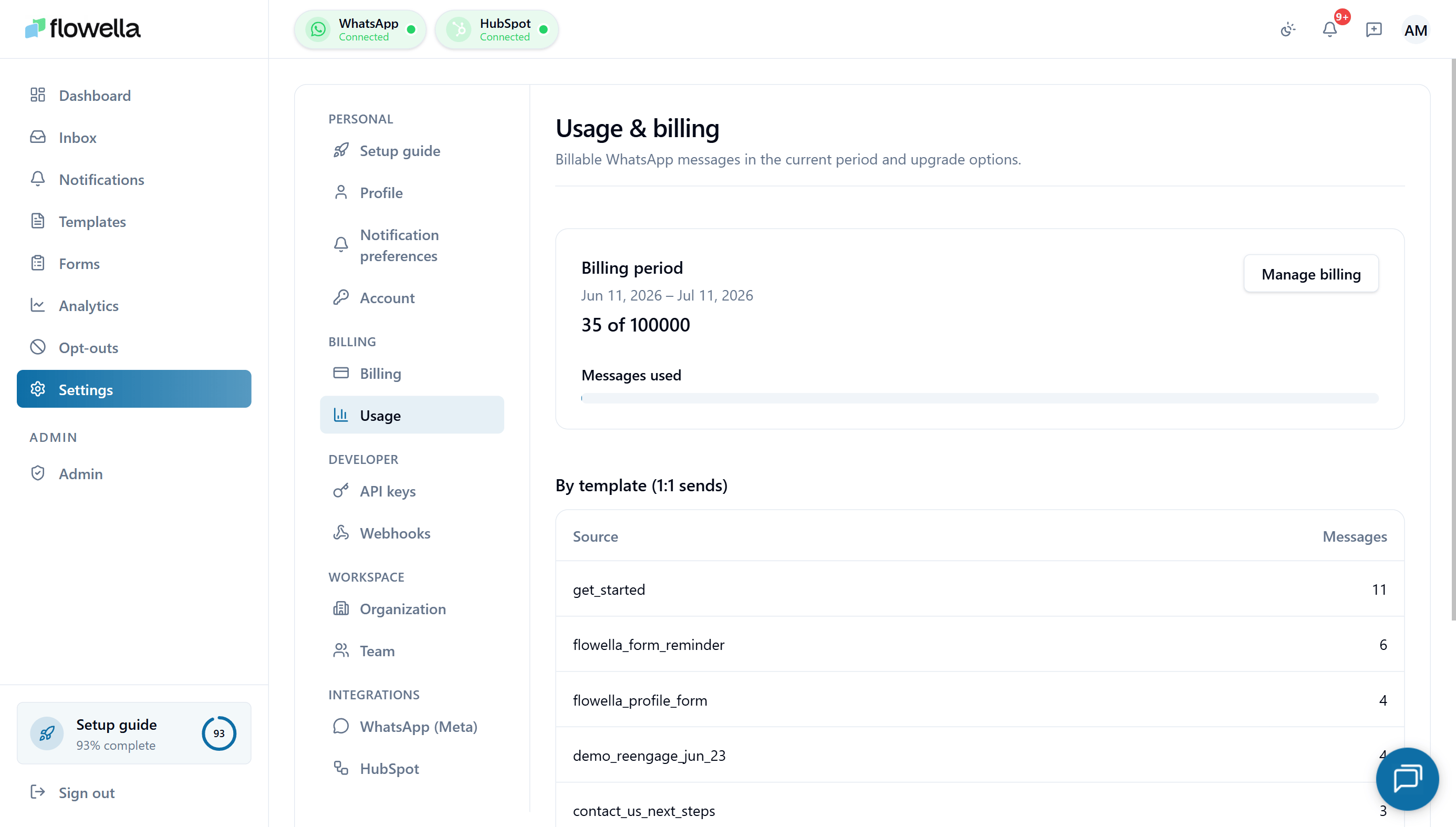 The Usage page shows how much of your plan's monthly allowance you've consumed, broken down by channel and by day. Use it to forecast overage, spot anomalies, and confirm exactly when your billing cycle resets.
For what counts as a conversation, and how Meta and Flowella charges line up, see [Pricing & conversation categories](/account/pricing-and-conversation-categories) and [Plans & limits](/account/plans-and-limits).
## Opening Settings → Usage
From the left navigation, go to **Settings → Usage**.
## What the page shows
### Current cycle
The top of the page shows your **current billing cycle** — start date, end date, days remaining, and a progress bar of conversations consumed against your plan's monthly allowance.
The cycle is based on your **subscription anniversary**, not the calendar month. If you signed up on the 14th, your cycle resets on the 14th of each month.
| Plan | Cycle | Allowance |
| ---------- | ------------------- | ---------------------------------------------- |
| Free Trial | 14 days from signup | 5,000 outbound messages (hard cap, no overage) |
| Free | Calendar month | (limited) |
| Starter | Monthly | 2,000 conversations |
| Pro | Monthly | 5,000 conversations |
| Enterprise | Per contract | Custom |
### Conversation counter
The big number under the progress bar is **conversations used this cycle**. It updates in near real time — every conversation that opens or closes ticks the counter within a few seconds.
Below the counter:
* **Inbound conversations** — started by a contact messaging you first.
* **Outbound conversations** — initiated by a template send.
* **Free Service-window replies** — counted toward your Flowella allowance even when Meta charges \$0 (see [Pricing & conversation categories](/account/pricing-and-conversation-categories)).
### Per-channel breakdown
If your org has multiple WhatsApp channels, the page shows a table with one row per channel:
* Channel name and WABA / phone number ID
* Conversations used this cycle
* 7-day trend sparkline
* Percentage of total org usage
This is useful for orgs that run multiple brands or markets and want to attribute usage to a specific number.
### Daily chart
A bar chart of conversations per day for the current and previous cycle, so you can spot spikes and weekly patterns. Hover any bar for the exact count.
### Historical cycles
A table of the last 12 billing cycles with usage and any overage. Each row links into the matching invoice in Stripe.
## Soft caps and hard caps
| Cap | What triggers it | What happens |
| -------------------- | ---------------------------------------------------------------------------- | ------------------------------------------------------------------------------------------------ |
| **`USAGE_SOFT_50`** | You've used 50% of your plan's allowance (or the trial's 5,000-message cap). | In-app and email alert. No restrictions. |
| **`USAGE_SOFT_80`** | You've used 80% of your allowance. | In-app and email alert. No restrictions. |
| **`USAGE_HARD_100`** | You've used 100% of your allowance. | On paid plans: overage rate applies. On trial: outbound sends are **blocked** until you upgrade. |
You can subscribe or unsubscribe from the soft alerts in [Settings → Notification preferences](/settings/notification-preferences). The hard-cap notification is mandatory.
## Allowance does not roll over
Unused conversations from this cycle **expire at the cycle reset**. They do not carry forward. If you regularly leave a large portion of your allowance unused, downgrading to a smaller plan is usually cheaper than absorbing the unused capacity.
See [Pricing & conversation categories](/account/pricing-and-conversation-categories#monthly-usage-does-not-roll-over) for more detail.
## Exporting
Click **Export** to download a CSV of:
* Current-cycle conversation totals (org + per channel + per day)
* The last 12 cycles' totals
* Any overage that has been billed
The CSV is useful for finance reconciliation against your Stripe invoices.
If your Stripe invoice and Flowella's usage counter disagree by more than a few conversations, check the **meter health** indicator on [Settings → Billing](/account/billing#usage-metering-and-stripe-meter-health). Persistent drift is usually a webhook problem and should be raised with support.
## Related
What each plan includes and how overage is priced.
What counts as a conversation and why Meta charges are separate.
Manage subscription and view invoices.
Subscribe to 50% / 80% usage alerts.
The Usage page shows how much of your plan's monthly allowance you've consumed, broken down by channel and by day. Use it to forecast overage, spot anomalies, and confirm exactly when your billing cycle resets.
For what counts as a conversation, and how Meta and Flowella charges line up, see [Pricing & conversation categories](/account/pricing-and-conversation-categories) and [Plans & limits](/account/plans-and-limits).
## Opening Settings → Usage
From the left navigation, go to **Settings → Usage**.
## What the page shows
### Current cycle
The top of the page shows your **current billing cycle** — start date, end date, days remaining, and a progress bar of conversations consumed against your plan's monthly allowance.
The cycle is based on your **subscription anniversary**, not the calendar month. If you signed up on the 14th, your cycle resets on the 14th of each month.
| Plan | Cycle | Allowance |
| ---------- | ------------------- | ---------------------------------------------- |
| Free Trial | 14 days from signup | 5,000 outbound messages (hard cap, no overage) |
| Free | Calendar month | (limited) |
| Starter | Monthly | 2,000 conversations |
| Pro | Monthly | 5,000 conversations |
| Enterprise | Per contract | Custom |
### Conversation counter
The big number under the progress bar is **conversations used this cycle**. It updates in near real time — every conversation that opens or closes ticks the counter within a few seconds.
Below the counter:
* **Inbound conversations** — started by a contact messaging you first.
* **Outbound conversations** — initiated by a template send.
* **Free Service-window replies** — counted toward your Flowella allowance even when Meta charges \$0 (see [Pricing & conversation categories](/account/pricing-and-conversation-categories)).
### Per-channel breakdown
If your org has multiple WhatsApp channels, the page shows a table with one row per channel:
* Channel name and WABA / phone number ID
* Conversations used this cycle
* 7-day trend sparkline
* Percentage of total org usage
This is useful for orgs that run multiple brands or markets and want to attribute usage to a specific number.
### Daily chart
A bar chart of conversations per day for the current and previous cycle, so you can spot spikes and weekly patterns. Hover any bar for the exact count.
### Historical cycles
A table of the last 12 billing cycles with usage and any overage. Each row links into the matching invoice in Stripe.
## Soft caps and hard caps
| Cap | What triggers it | What happens |
| -------------------- | ---------------------------------------------------------------------------- | ------------------------------------------------------------------------------------------------ |
| **`USAGE_SOFT_50`** | You've used 50% of your plan's allowance (or the trial's 5,000-message cap). | In-app and email alert. No restrictions. |
| **`USAGE_SOFT_80`** | You've used 80% of your allowance. | In-app and email alert. No restrictions. |
| **`USAGE_HARD_100`** | You've used 100% of your allowance. | On paid plans: overage rate applies. On trial: outbound sends are **blocked** until you upgrade. |
You can subscribe or unsubscribe from the soft alerts in [Settings → Notification preferences](/settings/notification-preferences). The hard-cap notification is mandatory.
## Allowance does not roll over
Unused conversations from this cycle **expire at the cycle reset**. They do not carry forward. If you regularly leave a large portion of your allowance unused, downgrading to a smaller plan is usually cheaper than absorbing the unused capacity.
See [Pricing & conversation categories](/account/pricing-and-conversation-categories#monthly-usage-does-not-roll-over) for more detail.
## Exporting
Click **Export** to download a CSV of:
* Current-cycle conversation totals (org + per channel + per day)
* The last 12 cycles' totals
* Any overage that has been billed
The CSV is useful for finance reconciliation against your Stripe invoices.
If your Stripe invoice and Flowella's usage counter disagree by more than a few conversations, check the **meter health** indicator on [Settings → Billing](/account/billing#usage-metering-and-stripe-meter-health). Persistent drift is usually a webhook problem and should be raised with support.
## Related
What each plan includes and how overage is priced.
What counts as a conversation and why Meta charges are separate.
Manage subscription and view invoices.
Subscribe to 50% / 80% usage alerts.